
ZOR AnimMixer
Blend any two stock RDR2 animations live into a pose that exists in neither clip. Pick a base and an overlay, compose it in game, fine-place it with the keyboard, and save it under your own name.
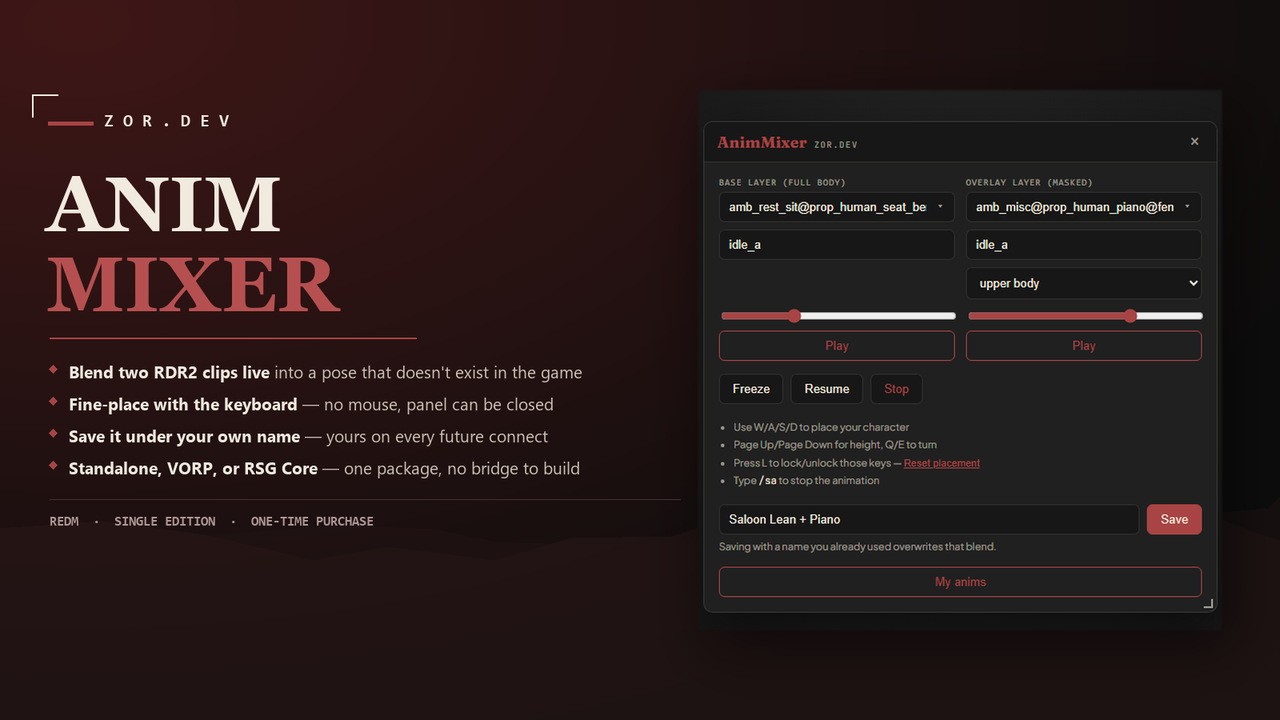
Pick · Blend · Place · Save
Live in-game clip picker
Search or browse RDR2's entire stock animation library by category, or type a dictionary/clip name directly — for both a base and an overlay layer, no Lua, no restart.
The composite is real, not a preview
The overlay runs alongside the base through a named bone mask instead of replacing it — upper body, lower body, legs, a single limb, or any of RedM's named filters. Each layer scrubs to its own phase independently.
How it feels in play
Facing-relative keyboard placement — W/A/S/D relative to which way you're facing, Page Up/Page Down for height, Q/E to turn. Works with the panel closed. Lock the keys off with L once you're happy with it.
No database
Saved blends are stored per player, keyed by your own license identifier, in the resource's own file-backed storage. Nothing to migrate, nothing to configure.
Three steps to a saved pose
Pick two clips
Base clip, overlay clip, from RDR2's stock library — search or browse by category, or type a dictionary/clip name directly.
Blend and place it
Play both, scrub each layer's phase independently, freeze the result, then fine-place it with the panel closed.
Save and recall it
Name it once. /animmix <name> plays it back directly, no UI required.
The composite replicates, not just renders locally
No lifecycle controls, no stop command needed on the observing client — a joining player resolves the composite from the server-authoritative state.
Standalone, VORP Core, or RSG Core
Pick one in config.lua — identical behavior in all three, no bridge to configure, no framework-specific setup beyond ensuring the resource.
| Requirements | RedM server · Standalone, VORP Core, or RSG Core |
| Editable | config.lua, locale table, documentation |
| Escrow-locked | client and server logic |
Up and running in two steps
Install the delivered build via Cfx Escrow.
Add ensure zor_animmixer to server.cfg — that's it, /animmix opens it in game.
Known limitations
- Stock RDR2 clips only — no custom .ycd animation authoring.
- A held blend does not cancel on movement, damage, death, or mounting up — deliberate, for a cosmetic posing tool.
- No admin permission gating — every connected player has access by default.
- Saved blends are private per-player; no shared/server-wide library.
Version history
What you can change
config.lua, the locale table, and documentation are yours to edit for your own server use. Client and server logic are Cfx Escrow-protected and are not editable — there is no separate "unlock" tier or second SKU.
Before you buy
Do I need a database?+
No — saved blends are stored per player in this resource's own file-backed storage. Nothing to migrate, nothing to configure.
Does it work with my framework?+
Standalone, VORP, and RSG Core all get identical behavior — pick one in config.lua, no separate bridge to configure.
Can two players see the same pose?+
Yes — the composite is a real animation task on the ped, not a client-side-only visual, so it replicates to other players.
Does placement work if I close the panel?+
Yes — placement is native keyboard bindings, not tied to the UI being open. Set your pose, close the panel, then fine-place it.
How are refunds and the licence handled?+
Delivery is a Cfx Escrow RedM Asset and is final once granted. Refund requests go through Tebex's own process via the order thread. One purchase covers the buyer's own server(s); redistribution or resale of the delivered files is not permitted. See the full refund & licence page.